Category: Alternatives

  • Snipin AI vs Opus Clip: Which Is Better for Event Clips?

    Snipin AI vs Opus Clip: Which Is Better for Event Clips?

    Every event generates content. Keynotes. Panel discussions. Q&A sessions. Product launches. But once the event ends, something strange happens. The recordings just sit there. You may upload the full session to YouTube. You may send a replay link via email. And then? Engagement drops. The real challenge is not hosting the event. The real challenge is repurposing it.

    Today, audiences prefer short-form content. They scroll fast. They watch highlights. They want value in under 60 seconds. That is why AI video clipping tools that can turn event recordings into shorts are becoming essential. Two tools often compared in this space are Snipin AI and Opus Clip. So in this guide, we will break down Snipin AI vs Opus Clip in a practical and event-focused way. This is a complete comparison of both products based on their features and capabilities.

    Why Event Clips Matter More Than Ever

    Very few people watch a full 60-minute session after an event. Even fewer watch a 3-hour conference replay. But short clips? Those get shared. Short clips get posted on LinkedIn. They get reshared in newsletters. They get embedded in blogs. That's what keeps the event alive. That is why using an event video clipping tool is no longer optional. It is necessary.

    With an AI-powered event highlights, you can:

    • Extend event visibility.
    • Increase speaker reach.
    • Improve sponsor value.
    • Drive traffic back to your brand.

    And most importantly, it helps maximize ROI. Without repurposing, your event impact ends with the end of the event. With smart clipping, your event can live for months. That is where the snipin ai vs opus clip comparison becomes important.

    What is an AI-powered Event Video Clipping Tool?

    An AI-powered Event Video Clipping Tool is a software application that uses artificial intelligence to automatically identify, extract, and format the most engaging moments from long-form event recordings (like webinars, conferences, or podcasts).

    Instead of a human editor manually scrubbing through hours of footage. These tools watch and listen to the content to create bite-sized, social-media-ready clips.

    What is Snipin AI? An Overview

    Snipin AI is an AI event content repurposing tool. Snipin AI is built specifically for events. It not only clips random moments. It is about structured event content repurposing.
    What is Snipin AI

    It focuses on:

    • Extracting meaningful highlights.
    • Capturing key takeaways.
    • Creating a microsite of event highlights.
    • Organizing clips specific to sessions.

    If you run conferences, webinars, expos, or town halls, this kind of structure matters. Snipin AI works like a dedicated event recap video tool. It aims to understand the flow of the session, identify important statements, and generate highlights that make sense in context.

    Instead of just asking, “What sounds viral?” It asks, “What is important?” This makes it a strong opus clip alternative for event teams who care about content quality and structure.

    What is Opus Clip? An Overview

    Opus Clip is a powerful AI clipping platform designed mainly for creators and marketers. The goal is simple with Opus Clip. Upload a long video and get multiple short clips automatically.
    What is Opus Clip

    It uses AI to detect strong hooks, emotional moments, and engagement triggers. Also, it optimizes clips for vertical formats, adds captions, and prepares them for social platforms. If your main goal is speed and social media visibility, Opus Clip performs well.

    It is designed for:

    • YouTubers.
    • Podcasters.
    • Influencers.
    • Marketing teams.

    It is highly effective when your focus is quick, short-form distribution. But when we analyze Snipin AI vs Opus clip from an event perspective, the priorities shift.

    Snipin AI vs Opus Clip: A Comprehensive Comparison of AI-based Video Summarizer Tools

    When it comes to the video repurposing tools with AI, Snipin AI and Opus Clip are often the two most popular names. Now let’s get into a detailed snipin ai vs opus clip comparison.
    Snipin AI vs Opus Clip: Comparison

    1. Target Audience

    Opus Clip is built primarily for content creators. Snipin AI is built primarily for event professionals. This affects everything from workflow to output style.

    If you are repurposing interviews or YouTube content, Opus Clip fits naturally. If you are handling multi-session conferences and large events, Snipin AI feels more aligned.

    2. Clipping Intelligence

    Opus Clip focuses on engagement-driven detection. It looks for:

    • Emotional spikes.
    • Strong opening hooks.
    • Sentences that grab attention.

    Snipin AI focuses on contextual understanding. It looks for:

    • Key insights.
    • Important announcements.
    • Topic transitions.
    • Structured moments.

    So when you want to turn event recordings into shorts, the type of intelligence matters. Snipin AI works better for events. Especially the events that want to clip out the ready-to-share moments, key insights, and summaries.

    3. Multi-Session Event Handling

    This is critical for conferences. Imagine a two-day event with 20 speakers. You need:

    • Speaker-specific highlights.
    • Session-wise breakdowns.
    • Organized content.

    Opus Clip processes videos individually. Snipin AI is better positioned for large-scale event repurposing workflows. In the Snipin AI vs Opus Clip comparison, this is a major difference for event organizers.

    4. Event Recap Capabilities

    An event video recap shows the top highlights and moments. Snipin AI leans toward structured recap workflows. It helps organize highlights in a way that reflects the session flow.

    Opus Clip focuses more on individual short clips rather than event highlights. If your goal is:

    • A summary-style event recap.
    • Highlight collections grouped by session.
    • Structured post-event content.

    Snipin AI offers more event-oriented capabilities.

    5. Event Marketing Workflows

    Event marketers don’t just need clips. They need recap pages, highlight reels, speaker spotlights, and post-event nurturing content. Snipin AI supports this broader workflow better. Opus Clip, on the other hand, is ideal if your goal is to only turn a video into reels for a week.

    6. Content Distribution Approach

    Opus Clip focuses on exporting clips quickly. Snipin AI focuses on building an event content library by showcasing structured summaries, clips, and highlights. That means Snipin AI can act more like a complete event highlight video tool, while Opus Clip acts like a quick clip generator. Both are valuable. But the use case determines the better fit.

    Snipin AI vs Opus Clip Comparison Table Based on Features

    Here is a quick comparison between the tools based on features.
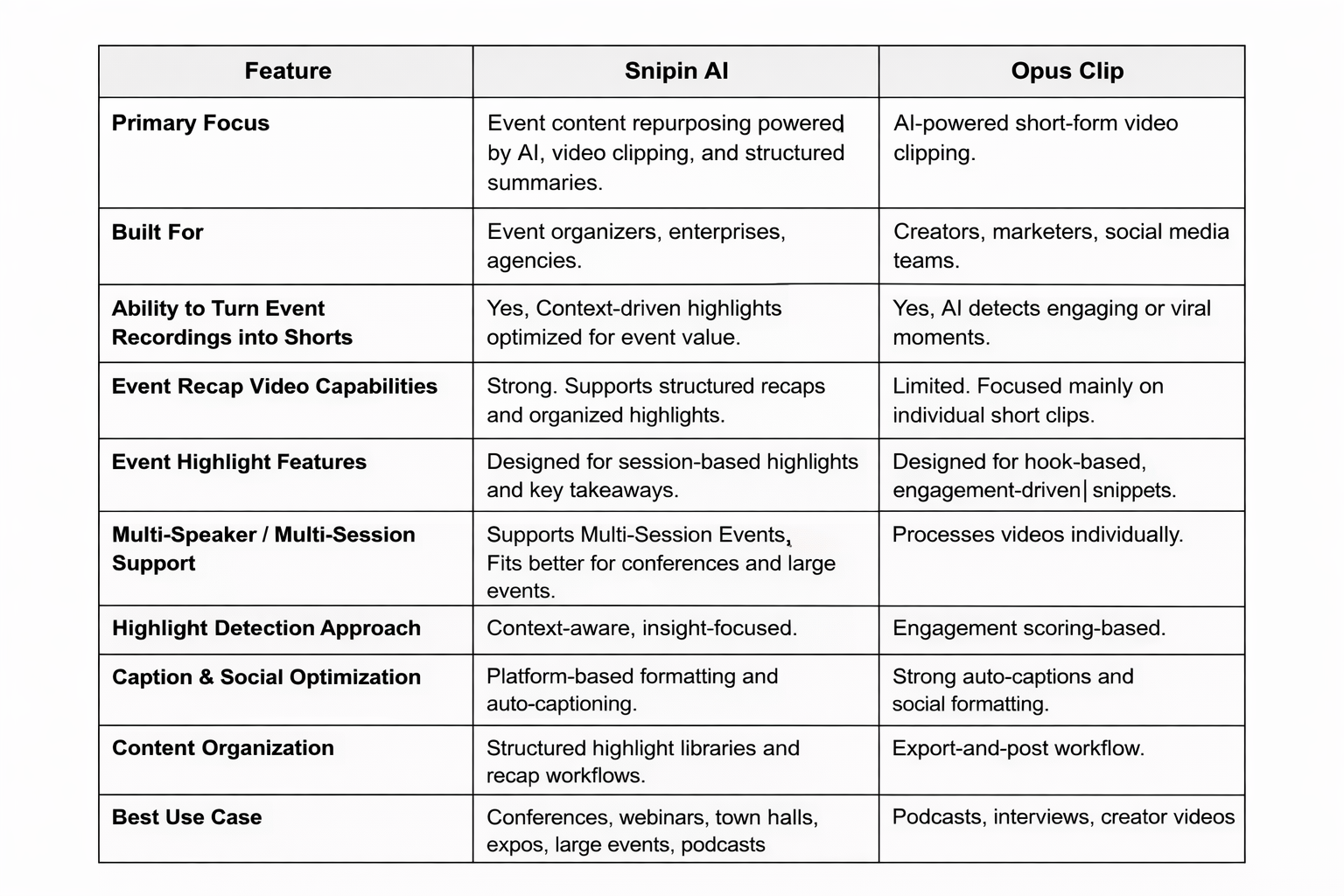
    Snipin AI vs Opus Clip Comparison
    AI-based Event Repurposing Tool

    Which AI Tool Is Better for Different Event Types?

    Corporate Town Halls

    Town hall meetings align employees with the company’s vision. They help make a strong organizational culture. So, you might need the top announcements, strategic updates, department insights, and internal recap content. Snipin AI works better here. It captures structured moments and supports recap workflows.

    Webinars

    If the webinar is educational and insight-heavy, Snipin AI helps capture key statements. You get the key takeaways that would work well as social clips. If the webinar is personality-driven and engagement-focused, Opus Clip may perform well for social snippets.

    Trade Shows

    If the goal is to get social media attention, Opus Clip does the job. If you need quick insights, shareable clips, and a centralized archive for the trade shows event, Snipin AI is a better Opus Clip alternative.

    Multi-Day Conferences

    This is where Snipin AI shines. You need:

    • Day-wise highlights.
    • Speaker reels.
    • Recap videos.
    • Evergreen marketing assets.

    Structured content management becomes critical. In this case, event teams lean towards Snipin AI.

    Creator-Led Virtual Events

    If a creator hosts a live workshop and wants quick Instagram reels, Opus Clip is highly efficient. If an enterprise brand hosts a virtual summit and wants a content library, Snipin AI is more aligned.

    Final Verdict

    To conclude on which tool is better depends on your goals. If you want quick, short-form clips or creator-focused workflows, Opus Clip works well.

    If your goal is to turn lengthy, boring event recordings into long-term engaging content, Snipin AI stands out. From shareable clips to structured highlights, you create a professional content library.

    Closing Thoughts

    Letting recordings sit unused is a missed opportunity. The future belongs to teams leveraging AI. They can turn event recordings into shorts, summaries, and highlights without manual editing chaos. AI summarizer tools are about transforming event content workflows. So, the real question is not which tool is more advanced. The real question is which tool aligns with your event strategy. Choose wisely. Your event does not end when it concludes. It ends when you stop repurposing it.

    FAQs

    1. Do I need editing skills to use these tools?
    No, both tools are built to reduce or remove the need for manual video editing. All you need to do is upload your footage. The application then automatically generates professional content. As a result, you save a significant time and effort.

    2. Which tool is better for event organizers?
    In most snipin ai vs opus clip comparisons, Snipin AI is considered more suitable for event organizers. While both tools are powerful, Snipin AI focuses on event summaries and shareable clips. That’s why it is an effective tool for capturing key moments of live gatherings.
    3. Can Snipin AI create event recap videos?

    Yes, it is an excellent tool for this purpose. Snipin AI helps organizers generate structured highlights and key takeaways from full sessions. It quickly turns full-length recordings into polished summaries. Summaries that showcase the most important takeaways from your event.

    4. How does Snipin AI help turn event recordings into shorts?

    Snipin AI automatically detects key insights, speaker highlights, and important moments in long sessions. Then, it converts them into short, shareable video clips.

    5. Does Snipin AI improve post-event engagement?
    Snipin AI keeps the conversation going by generating bite-sized clips and highlights. Sharing these highlights helps extend your event’s visibility, reaches a wider audience, and maintains strong engagement with your attendees and followers.
  • Vizard AI Alternatives: Turn Long Event Videos into Short Clips

    Vizard AI Alternatives: Turn Long Event Videos into Short Clips

    Vizard AI is one of the most popular AI video clipping tools, ideal for reusing content from events. If you've ever hosted events, you know how much work it takes to convert long recordings into short clips. Doing it yourself can be a real drag! That's where AI video clippers, like Vizard AI, can help. Since there are a variety of choices available, each has its own strengths and weaknesses. In this post, we'll cover some of the best Vizard AI alternatives and what makes them unique.

    What Do AI Video Clipping Tools Like Vizard AI Do Exactly?

    Almost all event planners will agree that post-event marketing is as gruelling as organizing the event itself. It requires thinking, creating, and posting content, all within strict deadlines. There's a mountain of pressure from stakeholders to get the event as much reach as possible so that the brand keeps growing. AI video clipping tools make event teams' work a lot easier by pulling social-media-ready content from long event recordings. Not all tools necessarily generate publishing content, but broadly, they are built to repurpose long videos for better use. Different event video repurposing tools work in different ways, and yet, some things remain common. That's why they are close alternatives to each other.

    The Best Vizard AI Alternatives You Need To Know About

    Vizard AI is widely counted among the most reliable event video repurposing tools out there. But it has some great alternatives as well. Check them out here:

    Snipin AI

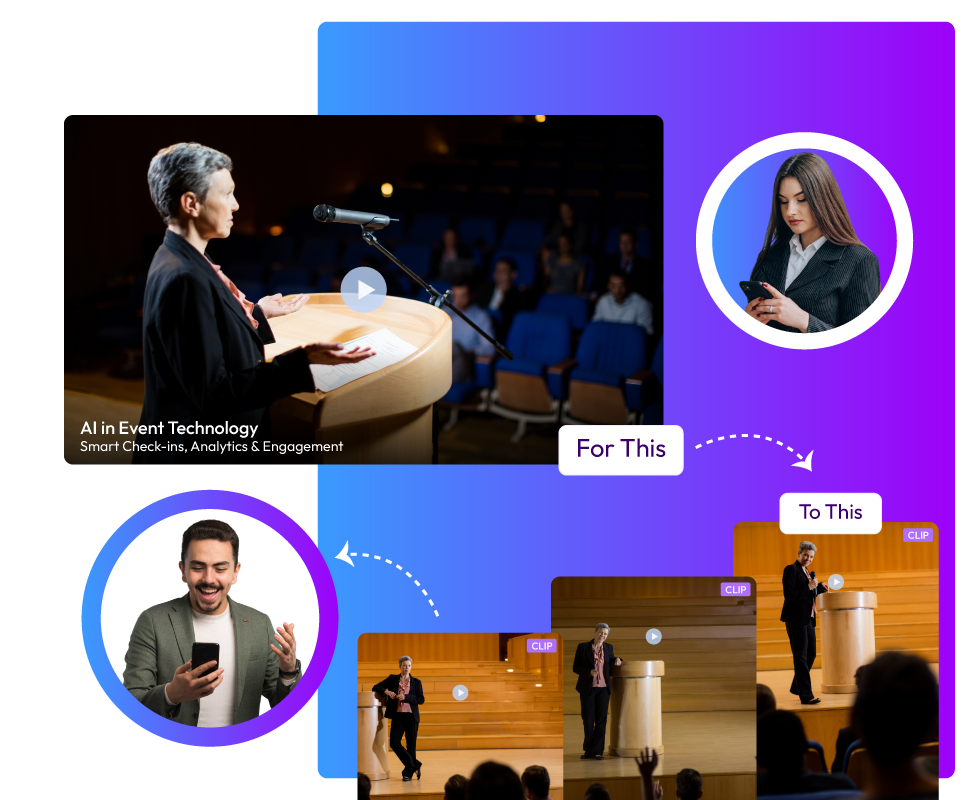
    Snipin AI is made just for events. This makes it one of the smartest event video highlight tools you can use. Upload your event recording, and you get ready-to-use highlight clips instantly. Short snippets, summaries, and key takeaways appear right away. No waiting.

    The tool handles all kinds of content. Conferences, townhalls, podcasts, workshops, webinars, and training sessions. Whatever you throw at it, Snipin AI processes it. One of the coolest things? Your clips keep the visual identity of your original recording. Logos stay in place. Overlays remain. Speaker layouts don't change.

    Here's what else makes Snipin AI special. You get a customizable microsite to showcase your highlights. Present your key event moments in a clean, branded space. Snipin AI makes your event content live far beyond the event days. You don’t have to worry about your event recordings going to waste!

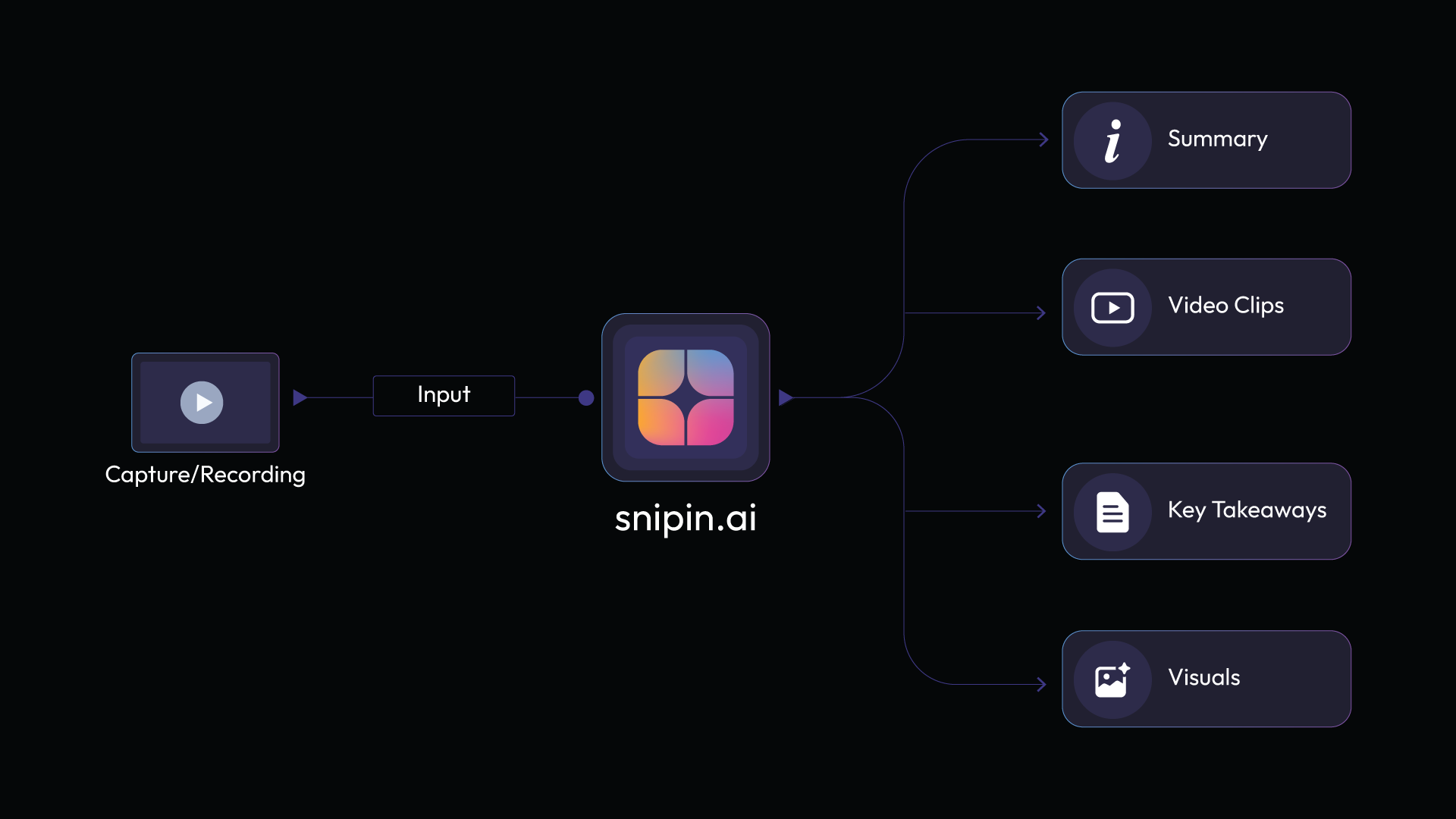
    Here’s a quick overview of Snipin AI’s features that make it stand out among other AI video clipping tools:

    Auto Snippet Generation Pulls out the best moments from your long videos without any manual work.

    AI Summaries Gives your audience a quick overview of each session so they can grasp the main points in seconds.

    Key Takeaways Picks out the most important insights and quotes that you can easily share on your blog, in emails, or on social media.

    Smart VisualsGrabs high-quality images and thumbnails from your videos that work perfectly for galleries or social posts.

    Microsite Publishing Builds a shareable webpage in moments where all your video snippets live in one place.

    Analytics DashboardShows you how your snippets are doing by tracking views, clicks, engagement, and shares.

    Reprocessing Engine Lets you regenerate snippets instantly if the first version isn't quite what you wanted.

    Snipin AI’s biggest plus is that it’s highly user-friendly. Just a few simple steps, and you get great content for your event promotion:

    1. Upload your event recording into the tool.

    2. Snipin AI scans it carefully and spots the best moments.

    3. It converts these moments into clips, snaps, and takeaways.

    Snipin ai tool

    Wisecut

    Wisecut is an AI video clipping tool that uses voice recognition for automatic editing. It finds awkward pauses in your videos and removes them. No more sitting through hours of footage hunting for bad moments.

    The tool creates jump cuts with punch effects. Your videos look clean and professional. Wisecut picks background music for you and adjusts it on its own. When someone speaks, the music volume drops. When there's silence, it comes back up.

    You get auto-generated subtitles in more than 100 languages. Silent sections disappear automatically. There's an auto-zoom feature to keep viewers engaged. And you can edit by changing the transcript text. Delete words you don't want, and the video changes instantly.

    Opus Clip

    Opus Clip is one of those AI video clipping tools that hunts for viral moments. It analyzes your long videos and picks out the best parts. Then it creates short clips ready for social media.

    Opus Clip handles different video styles. Podcasts work well. So do webinars, commentary videos, and educational content. The AI detects speaker energy and keywords to find punchy moments. You can add brand templates with your logos and colors. Everything stays consistent.

    One useful feature? Export clips in multiple aspect ratios. Horizontal for YouTube. Vertical for TikTok and Reels. Square for Instagram posts. The tool handles all of it.

    SnapSight

    SnapSight takes a different approach from other event video highlight tools. It focuses on real-time content summarization during live events. When speakers talk, SnapSight captures the key takeaways on the spot.

    The platform creates interactive "idea clouds." These show the main themes from each session visually. Attendees click on concepts to explore them deeper. Everything updates in real time as the event unfolds.

    SnapSight works in over 40 languages. Language barriers disappear at global events. You can process past recordings, too. Upload your old event videos, and SnapSight pulls out the insights.

    For event organizers, this boosts engagement. Attendees get value immediately instead of waiting for post-event content. The tool integrates easily with existing event apps. You just need one laptop to get started.

    Vozo AI

    Vozo specializes in video translation and dubbing. But it also creates short clips from long videos. The platform uses AI to analyze your footage and spot engaging moments.

    You get accurate auto-generated subtitles with customizable styles. Vozo offers over 100 digital avatars you can use. These make your videos more engaging without needing real presenters. There's voice cloning technology, too. Record your voice once and use it for multiple videos.

    Auto-reframe keeps speakers centered even in dynamic conversations. Subtitle translation works across many languages. Your content becomes accessible globally.

    Vozo works great for educational content, product demos, and marketing videos. The batch processing feature handles multiple videos at once. Got a library of content? Repurpose it all efficiently.

    Descript

    Descript takes a unique approach. Edit videos by editing text. Upload your footage, and it transcribes everything automatically. Delete words from the transcript and the video updates.

    The tool has an AI assistant called Underlord. Tell it what you want, and it edits for you. Remove filler words with one click. Add captions automatically. Clean up audio with Studio Sound. Change backgrounds without a green screen.

    The text-based editing makes it super beginner-friendly. No timeline confusion. Edit like you're working in a document. You can create AI avatars that present your content, too. Stay off camera if you prefer.

    Try Snipin AI

    InVideo AI

    InVideo AI generates complete videos from text prompts. Describe what you want, and the tool creates it. It writes scripts, picks visuals, adds voiceovers, and includes background music. All automatically.

    Edit videos using simple text commands through the Magic Box. Type things like "delete this scene" or "change the accent." The AI understands and makes the changes. No complex editing skills needed.

    The AI picks relevant content to match your script. Customize everything afterward. The tool supports over 50 languages for voiceovers.

    For event content, turn session recordings into social clips. The AI identifies key moments and creates short versions. Perfect for promoting future events. Plans start free with basic features. Paid plans give you more AI credits and premium stock assets.

    CapCut

    CapCut is a popular long video to short video AI editor with powerful automation. There's an AI script-to-video feature. Write your idea, and CapCut generates a complete video. It picks visuals, adds voiceovers, and includes music. You get over 100 digital avatars to choose from. Or clone your own avatar for custom videos.

    CapCut offers auto-reframe for different platforms. One video becomes multiple formats automatically. The AI background remover works instantly. Click, and the background disappears. Replace it with anything you want.

    The tool cleans audio automatically, too. The long-to-shorts converter finds the best moments in your recordings. CapCut works on web, desktop, and mobile. Edit anywhere you want.

    Pictory

    Pictory turns text into videos quickly. Paste your script, and it creates a video with scenes, visuals, and voiceovers. There's a feature for editing videos using text, too. Upload a video,o and Pictory transcribes it. Edit the transcript and the video changes.

    Pictory works great for repurposing blog posts. Turn written content into video content easily. The tool adds captions automatically. Add your brand elements. Upload logos, set your colors and fonts. Perfect for turning webinars or conferences into social media clips.

    Veed

    Veed is browser-based, so there's no software to download. Upload your footage and start editing immediately.

    The auto-edit feature is powerful. Edit by changing the transcript. Just like editing a document. Eye contact correction makes it look like you're staring at the camera. Even if you weren't. The voice clone feature lets you create voiceovers without recording.

    There's text-to-video generation too. You get access to stock media libraries. Music, video clips, and images are all included. The collaboration features let teams work together in real time. Everyone can comment and edit simultaneously.

    The Bottom Line:

    Vizard AI has some great alternatives. Snipin AI is good for events. Wisecut rocks at talking-head videos. Opus Clip finds clips that could go viral. SnapSight helps out during live events. Vozo handles translation and dubbing. Descript lets you edit video by editing text. InVideo AI makes videos from simple cues. CapCut brings editing to your phone. Pictory can turn blog posts into videos. Veed is good for all your online editing needs. Basically, these AI video tools save time. Things that took days now take hours or minutes. They help you make more content, faster. Now, anyone can get professional-looking videos using AI!

    FAQs

    What are AI video clipping tools, and why do event planners need them?
    AI video clipping tools automatically turn long event recordings into short, shareable clips. They save event planners tons of time on post-event marketing by finding the best moments and creating social media content instantly.

    Which Vizard AI alternative is best for event content?

    Snipin AI is the best choice for event content. It works well with conferences, webinars, workshops, and almost all event types.

    How do these tools help with repurposing long conference recordings?

    Event video repurposing tools analyze your full conference recordings and automatically detect the best moments.

    Do I need video editing experience to use these tools?

    Not at all! These tools are built for beginners. Many let you edit by changing text transcripts instead of using confusing timelines. Just delete words you don't want, and the video updates automatically.